

How to Make an App Like Amazon Alexa
How to Make an App Like Amazon Alexa
Voice is no longer a novelty feature — it is a primary interface. Amazon Alexa proved that people are perfectly happy to talk to their software, and the ripple effect has been enormous: smart speakers, in-car assistants, voice-enabled banking apps, and hands-free warehouse tools all trace their lineage back to that pattern.
If you are planning to build a voice assistant app of your own, this guide walks through what Alexa actually does under the hood, the technology stack you need, the development roadmap, and the costs and pitfalls to plan for.
We cover a closely related subject in How to Make an App Like Siri.
What Alexa Actually Is (and Why That Matters)
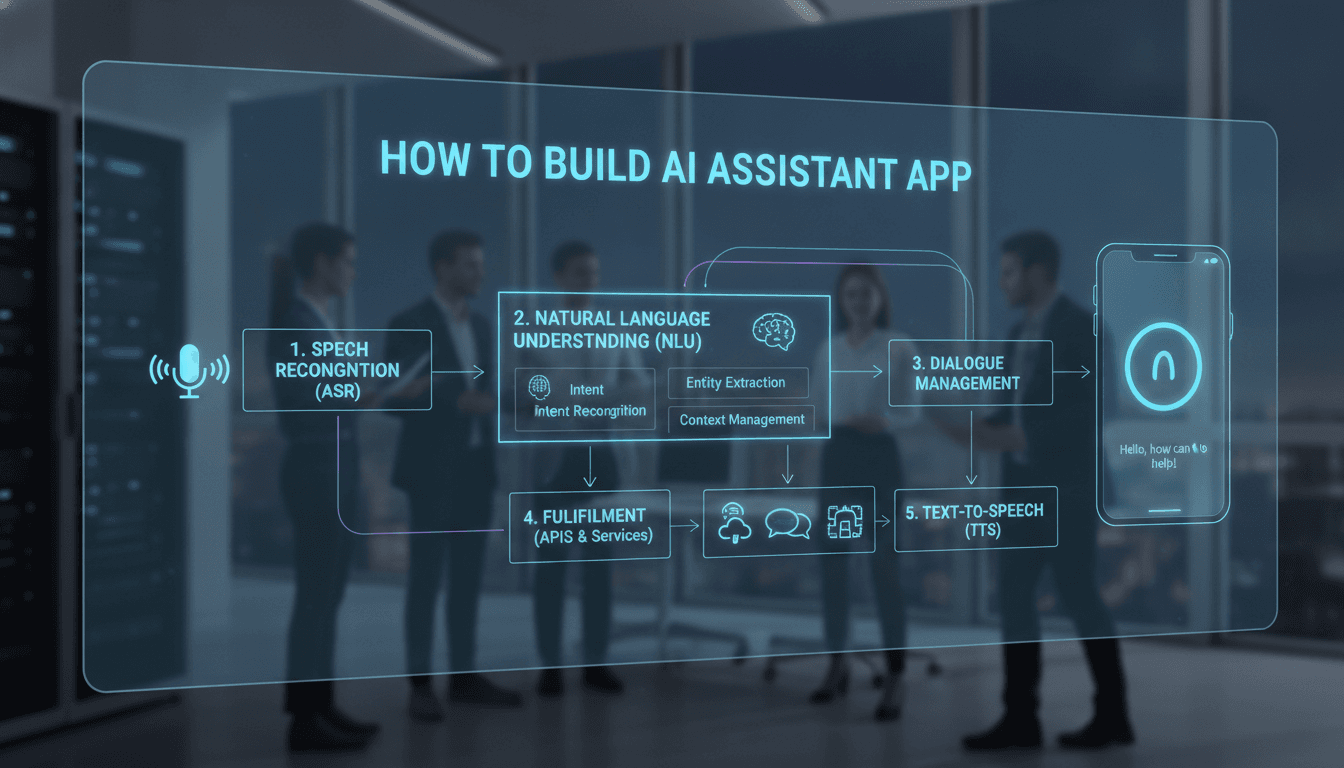
Before writing a line of code, it helps to be precise about what you are cloning. "An app like Alexa" is really five systems working in concert:
- Wake word detection — a lightweight, always-on model listening for a trigger phrase ("Alexa", "Hey Google") directly on the device.
- Automatic Speech Recognition (ASR) — converting the captured audio into text.
- Natural Language Understanding (NLU) — extracting intent ("play music") and entities/slots ("Fleetwood Mac", "on the kitchen speaker") from that text.
- Skill / action fulfilment — routing the intent to business logic, APIs, or third-party integrations that actually do the thing.
- Text-to-Speech (TTS) — generating a natural-sounding spoken response.
Alexa's real moat was never the voice recognition. It was the skills ecosystem — thousands of third-party developers extending the assistant. Keep that in mind when you scope your product.
For a closer look at a related topic, read our guide on How to Make an App Like Google Assistant.
Step 1: Define Your Niche — Don't Build a General Assistant
Competing head-on with Amazon, Google, and Apple on general-purpose assistance is a losing proposition. They have billions in R&D spend, mountains of training data, and hardware distribution.
You may also find our article on How to Make an App Like Bixby useful.
Successful voice products in the last few years have almost all been vertical assistants:
- Healthcare — hands-free clinical note dictation and patient intake.
- Automotive — offline-capable in-cabin control and navigation.
- Logistics & warehousing — voice picking that keeps workers' hands and eyes free.
- Smart home / IoT — control layers for a specific hardware ecosystem.
- Banking & fintech — balance checks, transfers, and fraud reporting by voice.
- Hospitality — in-room assistants for hotels and serviced apartments.
A narrow domain means a smaller intent vocabulary, higher accuracy, faster training, and a genuinely defensible product. Pick one.
Step 2: Choose Your Core Features
Must-have (MVP)
| Feature | Why it matters |
|---|---|
| Wake word / push-to-talk | Entry point to the whole experience |
| Speech-to-text | Foundation of every interaction |
| Intent & entity recognition | Turns words into actions |
| Text-to-speech responses | Closes the conversational loop |
| User accounts & auth | Personalisation and security |
| Multi-turn conversation context | Follow-up questions without repetition |
| Basic analytics | You cannot improve what you cannot measure |
Phase two
- Multi-language and accent support
- Voice biometrics / speaker identification
- Offline or edge processing mode
- Third-party skill SDK and developer portal
- Smart home / IoT device pairing
- Cross-device handoff (phone → speaker → car)
- Proactive notifications and routines
Step 3: Pick Your Technology Stack
Speech recognition and synthesis
You have three broad paths:
Cloud APIs (fastest to market)
- OpenAI Whisper / GPT-4o Realtime API
- Google Cloud Speech-to-Text & Text-to-Speech
- Amazon Transcribe & Polly
- Azure AI Speech
- Deepgram, AssemblyAI, ElevenLabs (excellent synthetic voices)
Open-source, self-hosted (control and cost at scale)
- Whisper / faster-whisper for ASR
- Coqui TTS or Piper for synthesis
- Rasa or Snips-style NLU for intent parsing
- Porcupine or openWakeWord for wake word detection
Hybrid — on-device wake word and simple commands, cloud for heavy lifting. This is what Alexa itself does, and it is usually the right answer.
Natural language understanding
Modern builds increasingly skip hand-crafted intent trees and use an LLM with function calling as the reasoning layer. You describe your available actions as tools, and the model decides which to invoke with which parameters. This dramatically shortens development time and handles phrasings you never anticipated.
The trade-off is latency, cost per request, and non-determinism. A pragmatic pattern is a router: fast, deterministic intent matching for your top 50 commands, LLM fallback for everything else.
Client applications
- iOS — Swift/SwiftUI, AVAudioEngine, SiriKit integration
- Android — Kotlin, Jetpack Compose, MediaRecorder / Oboe
- Cross-platform — Flutter or React Native with native audio modules
- Embedded/hardware — C++ or Rust on Linux, often with an ARM SoC
Backend and infrastructure
- Runtime — Node.js, Python (FastAPI), or Go for low-latency streaming
- Streaming transport — WebSockets or WebRTC, not REST; voice needs bidirectional streaming
- Orchestration — Kubernetes for GPU-backed inference services
- Data — PostgreSQL for relational, Redis for session/context, a vector database (Pinecone, pgvector, Weaviate) for retrieval-augmented answers
- Queueing — Kafka or RabbitMQ for async skill execution
Step 4: Architect for Latency
Users forgive a wrong answer faster than a slow one. Aim for under 800ms from end-of-speech to start-of-response.
Practical techniques:
- Stream everything. Start transcribing while the user is still talking, and start speaking while the response is still generating.
- Use voice activity detection (VAD) to detect end-of-utterance rather than waiting for a fixed silence timeout.
- Cache aggressively. Common responses, TTS audio clips, and user context should never be recomputed.
- Deploy at the edge. Region-local inference endpoints cut hundreds of milliseconds.
- Pre-warm connections. Keep the WebSocket and model session open between turns.
Step 5: Build the Skills Framework
If you want an ecosystem rather than a single-purpose app, invest early in a clean extension model:
- A declarative manifest where a skill defines its intents, sample utterances, and slots
- A sandboxed execution environment (serverless functions work well) so third-party code cannot compromise your platform
- Scoped permissions — a skill should request access to location or contacts explicitly
- A certification pipeline with automated utterance testing before publication
- Clear revenue sharing if you want serious developer interest
Step 6: Development Roadmap
Phase 1 — Discovery and design (3–5 weeks) Define the domain, map intents and conversation flows, write the voice UX script, design the visual companion UI, and choose the stack.
Phase 2 — Prototype (4–6 weeks) Wire up ASR → NLU → TTS end to end with 10–15 intents. Validate latency and accuracy with real users in real acoustic conditions.
Phase 3 — MVP build (10–16 weeks) Full client apps, backend services, auth, context management, analytics, and your initial skill set.
Phase 4 — Training and tuning (ongoing, 4+ weeks concentrated) Collect real utterances, retrain intent models, expand synonym coverage, tune wake word false-accept/false-reject rates.
Phase 5 — Beta and launch (4–8 weeks) Closed beta, accessibility audit, privacy and security review, store submission, and go-live.
Realistically, a solid vertical voice assistant MVP takes five to eight months with a team of six to nine people.
Voice UX: The Part Most Teams Underestimate
Conversational design is a discipline in its own right. Some hard-won rules:
- Keep responses short. Reading a paragraph aloud is torture. Three sentences maximum.
- Confirm destructive actions. "Should I delete all 400 files?" is a required question.
- Fail gracefully and usefully. "I didn't catch that" is useless. "I can check your balance or make a transfer — which would you like?" is helpful.
- Never rely on the user remembering a menu. Voice has no visual affordances.
- Design for barge-in. Users interrupt. Let them.
- Always offer a screen fallback. Some tasks genuinely need a visual list.
Privacy, Security, and Compliance
Voice data is biometric data in many jurisdictions. Treat it accordingly.
- Explicit, granular consent for recording, storage, and model training — separately
- On-device wake word processing so nothing leaves the device until intentionally triggered
- Encryption in transit (TLS 1.3) and at rest (AES-256)
- A visible, unambiguous mute — a hardware switch on hardware products
- Short retention windows and easy, complete user deletion
- Regulatory alignment — GDPR, CCPA, BIPA (Illinois biometric law is unusually aggressive), and HIPAA if you touch health data
- Child protection — COPPA compliance if minors may use the product
Getting this wrong is not just a fine; it is a trust failure that voice products rarely recover from.
What It Costs
Ballpark ranges for a professionally built product:
| Scope | Typical range |
|---|---|
| Proof of concept / prototype | $25,000 – $50,000 |
| Vertical MVP (one platform) | $70,000 – $140,000 |
| Full cross-platform assistant | $150,000 – $300,000 |
| Platform with skills ecosystem + hardware | $350,000+ |
Ongoing costs are significant and often forgotten: ASR and LLM inference billed per minute or per token, TTS per character, GPU hosting, and a permanent ML operations function to keep accuracy from drifting.
Monetisation Options
- Hardware margin — the classic Amazon and Google play
- B2B licensing — white-label the assistant into other companies' products
- Subscription — premium voices, unlimited usage, advanced skills
- Transaction fees — a cut of voice commerce or bookings
- Enterprise SaaS — per-seat pricing for workforce voice tools
For most new entrants, B2B and enterprise licensing are far more viable than consumer hardware.
Common Mistakes to Avoid
- Building general instead of specific. Breadth is Amazon's game, not yours.
- Testing only in quiet rooms. Real users are in cars, kitchens, and warehouses.
- Ignoring accents and dialects. Accuracy that only works for one demographic is broken accuracy.
- Treating voice as a UI skin. Conversation requires its own information architecture.
- Skipping analytics on failed utterances. Your misrecognitions are your product roadmap.
- Underfunding the post-launch ML work. A voice assistant is a living system, not a shipped artefact.
Final Thoughts
Building an app like Alexa has never been more achievable. The models that used to require a research lab are now API calls, and open-source alternatives are genuinely production-grade. What has not changed is the hard part: choosing a domain worth owning, obsessing over latency, designing conversations that respect the user, and handling voice data with real care.
Start narrow, ship something that works flawlessly for one job, then expand outward. That is how voice products earn a place in people's homes and workflows — and how they stay there.
Have a project in mind? Contact Sodio Technologies to discuss your requirements and explore the right technology solution for your business.
/// Work with us
Talk to the engineers who'd build it
You'll get a technical scope, timeline and cost estimate from the people doing the work, not an account manager. In-house team, no subcontracting, since 2016.