

How to Make an App Like Kroger
How to Make an App Like Kroger
Grocery shopping has changed forever. What used to mean pushing a cart down a fluorescent-lit aisle now means tapping a few buttons, choosing a pickup window, and having someone else squeeze the avocados for you. Kroger, one of America's largest grocery retailers, has been at the center of that shift — its app blends digital coupons, loyalty rewards, order-ahead pickup, delivery, and in-store navigation into a single experience that millions of shoppers open every week.
If you're a grocery chain, a regional supermarket, or a startup eyeing the online grocery space, building an app like Kroger is an ambitious but very achievable goal. Here's how to approach it.
For a closer look at a related topic, read our guide on How to Make an App Like Walmart Grocery.
Why Build a Grocery App Like Kroger?
Before writing a line of code, it helps to understand what makes the Kroger model work so well.
Recurring purchase behavior. Groceries aren't a once-a-year purchase. People buy food weekly, sometimes more often. That means high retention potential and predictable order volume if you get the experience right.
Loyalty is sticky. Kroger's fuel points and personalized digital coupons give shoppers a concrete reason to keep coming back rather than bouncing between competitors.
Data becomes the product. Every scan, search, and reorder feeds a recommendation engine that makes the next shopping trip faster — and more profitable.
Omnichannel is the expectation. Shoppers want to browse online, pick up in store, get something delivered the same day, and scan items while walking the aisles. An app is the connective tissue between all of it.
Core Features Your Grocery App Needs
Customer-Facing Features
Onboarding and account management Keep sign-up frictionless. Phone number or social login, optional loyalty card linking, and a saved store location. Ask for the minimum up front and collect the rest later.
Store locator and store selection Inventory, pricing, and promotions vary by location. Let users set a home store and switch easily. Tie this into geolocation so the app defaults to the nearest branch.
Product catalog and smart search This is the heart of the app. You'll need category browsing, filters (organic, gluten-free, brand, price), and a search engine that understands typos, synonyms, and natural phrasing. Someone searching "coke" should find Coca-Cola. Someone searching "taco night" should get inspiration, not zero results.
Shopping cart and list management Support persistent carts across devices, saved lists, and one-tap reordering of previous purchases. Reorder is one of the highest-value features in grocery — most households buy the same 40 items over and over.
Digital coupons and personalized offers Let shoppers clip digital coupons that apply automatically at checkout. Personalize the offers using purchase history. This is a major driver of app opens.
Loyalty and rewards Points, tiers, fuel discounts, member-only pricing — whatever your program is, it needs to live natively in the app with a clear balance and redemption flow.
Checkout, payment, and fulfillment options Offer pickup, curbside, and delivery with clear time slots and fees. Support credit cards, digital wallets, EBT/SNAP where applicable, and gift cards. Let users choose substitution preferences item by item.
Order tracking and communication Real-time status updates, shopper messaging for substitutions, and delivery tracking on a map. Ambiguity is the enemy of trust in grocery fulfillment.
In-store mode Aisle location lookup, barcode scanning for price checks, scan-as-you-shop, and a running total. This is where a grocery app differentiates from generic e-commerce.
Weekly ad and recipes Digital circulars keep browsing habits alive, and recipe content with "add all ingredients to cart" is a proven basket-size booster.
Admin and Operations Features
- Inventory and catalog management with per-store pricing
- Order management dashboard for pickers and fulfillment staff
- Picker mobile app with optimized in-store routing
- Promotion and coupon builder
- Delivery dispatch and driver assignment
- Customer support console with order history and refunds
- Analytics: basket size, conversion, fill rate, substitution rate, retention cohorts
Picker and Driver Apps
Don't overlook these. The customer app is only as good as the fulfillment behind it. Pickers need batch assignment, item-by-item scanning, substitution suggestions, and a route through the store. Drivers need navigation, proof of delivery, and route batching.
If this is relevant to your project, check out How to Make an App Like Safeway.
The Technology Stack
Mobile front end React Native or Flutter gets you iOS and Android from one codebase, which is usually the right call for a grocery app where feature velocity matters more than squeezing out native performance. Go native (Swift/Kotlin) if you need deep hardware integration like advanced barcode scanning or indoor positioning.
Back end A microservices architecture makes sense here because catalog, pricing, orders, loyalty, and fulfillment all scale differently. Node.js, Python (Django/FastAPI), or Java/Spring are all solid choices. Use an API gateway in front and event streaming (Kafka) between services.
Databases PostgreSQL for transactional data like orders and accounts. Redis for carts, sessions, and hot inventory counts. Elasticsearch or Algolia for product search. A data warehouse like Snowflake or BigQuery for analytics.
Cloud and infrastructure AWS, Google Cloud, or Azure with containerized services on Kubernetes. Grocery traffic is spiky — weekend mornings and holidays especially — so autoscaling matters.
Integrations This is often the hardest part. You'll be connecting to POS systems, ERP or merchandising platforms, warehouse management, payment processors, mapping and routing APIs, SMS/push providers, and possibly third-party delivery networks.
AI and personalization Recommendation engines for "you might also need," demand forecasting for inventory, dynamic substitution suggestions, and search relevance tuning. These start as nice-to-haves and quickly become competitive necessities.
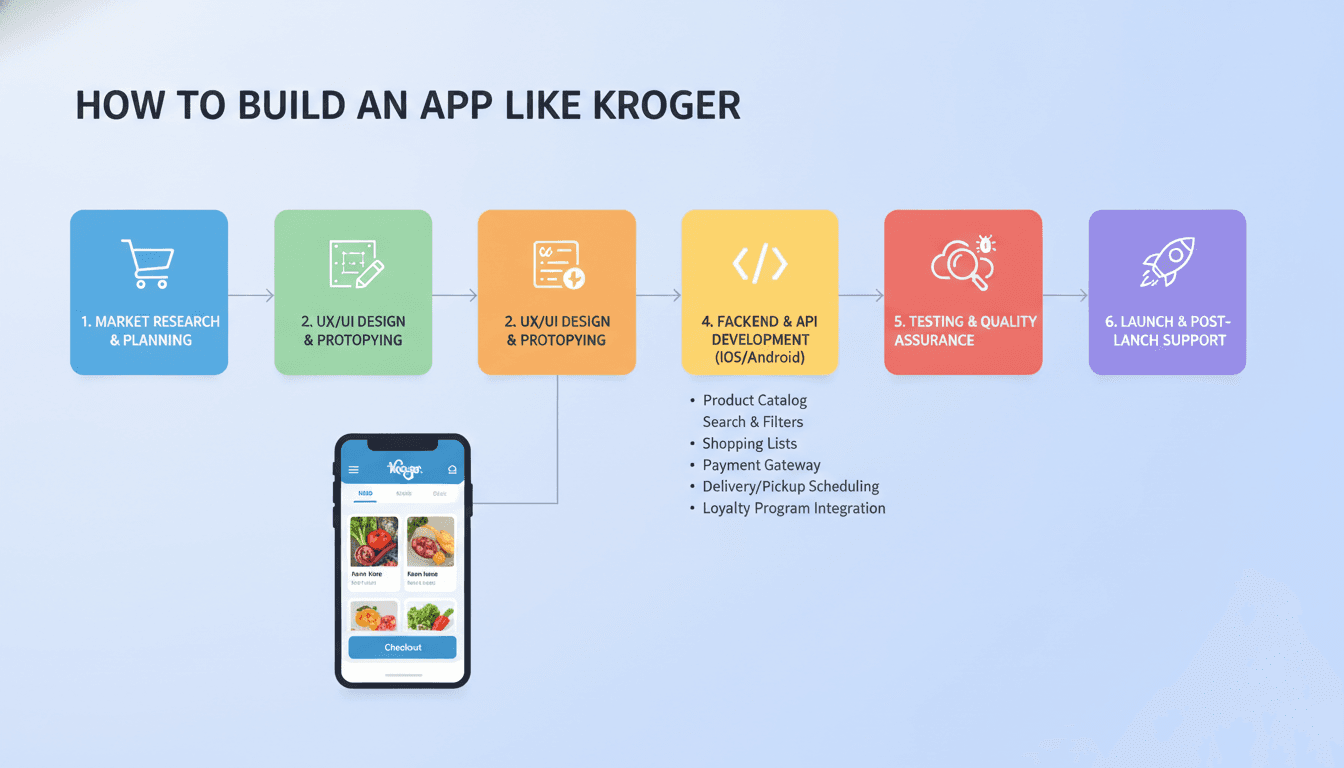
The Development Process
1. Discovery and strategy. Define your market, fulfillment model, and differentiator. Are you pickup-first? Delivery-first? Serving a niche like halal, Latino, or organic grocery? This shapes everything downstream.
2. UX research and wireframing. Grocery apps live or die on speed. A user adding 30 items should never feel friction. Map the flows, test them with real shoppers, and iterate before design.
3. UI design. Clean, high-contrast, image-forward. Large tap targets for people shopping one-handed with a cart in the other hand. Accessibility isn't optional — your customer base spans every age and ability.
4. Architecture and API design. Lock in data models for products, inventory, pricing, and orders early. Retrofitting per-store pricing later is painful.
5. MVP development. Ship a focused first version: browse, cart, checkout, pickup, and order tracking for a limited number of stores. Prove the fulfillment operation works before scaling features.
6. Testing. Functional, load, payment security, and real-world pilots in actual stores. Store-level testing will expose problems no staging environment can.
7. Launch and iterate. Roll out store by store or region by region. Watch fill rates and substitution complaints closely — those are your early warning signals.
Costs and Timeline
Estimates vary widely with scope, but a rough framing:
| Scope | Timeline | Ballpark Cost |
|---|---|---|
| MVP (browse, cart, pickup, single region) | 3–5 months | $60,000 – $120,000 |
| Full-featured app (delivery, loyalty, coupons, in-store mode) | 6–10 months | $150,000 – $300,000 |
| Enterprise platform (multi-store, picker + driver apps, AI personalization, deep POS/ERP integration) | 10–18 months | $300,000+ |
Budget for ongoing costs too: cloud infrastructure, payment processing, third-party APIs, app store fees, and a maintenance retainer that's typically 15–20% of build cost annually.
For a closer look at a related topic, read our guide on How to Make an App Like Amazon Fresh.
Monetization Models
- Direct product margin — the obvious one if you're the retailer
- Delivery and service fees per order
- Paid membership offering free delivery and exclusive pricing (the Kroger Boost model)
- Retail media — brands paying for sponsored placement in search results and category pages, which has become an enormously profitable line for large grocers
- Marketplace commissions if you host third-party sellers
Challenges to Plan For
Inventory accuracy. Nothing erodes trust faster than ordering items that aren't actually on the shelf. Invest in real-time inventory sync and honest availability signals.
Substitutions. Get preferences granular and communication fast. A good substitution experience turns a potential complaint into loyalty.
Unit economics. Grocery margins are thin. Picking and delivery labor can eat them entirely. Model your cost per order early and design the app to nudge toward profitable behaviors — larger baskets, pickup over delivery, off-peak slots.
Compliance. Payment security (PCI DSS), data privacy (CCPA, GDPR), accessibility (WCAG/ADA), and regulations around alcohol, tobacco, and EBT payments.
Peak load. Holidays and weather events create enormous traffic spikes. Architect for them.
Tips for Standing Out
You won't beat Kroger by copying Kroger. Differentiate on something specific:
- Hyper-local focus — serve a region or community the giants underserve
- Specialty catalogs — international, organic, dietary-restriction-first
- Better personalization — an app that genuinely learns a household's rhythm and rebuilds the weekly list automatically
- Speed — a sub-two-minute reorder-and-checkout flow
- Transparency — honest inventory, honest substitution, honest pricing
Final Thoughts
Building an app like Kroger is less about replicating a feature list and more about building a reliable operational machine with a great interface on top of it. The app is the visible part; the inventory sync, picker workflow, and delivery logistics are what actually determine whether customers come back.
Start with a tight MVP, prove your fulfillment model in a handful of stores, and expand from there. Get the boring parts right — accurate inventory, fast search, easy reorder — and the rest of the experience has room to shine.
If you're ready to explore what a grocery app would look like for your business, the best first step is a discovery session to scope your fulfillment model and integration requirements. That's where the real roadmap gets built.
Have a project in mind? Contact Sodio Technologies to discuss your requirements and explore the right technology solution for your business.
/// Work with us
Talk to the engineers who'd build it
You'll get a technical scope, timeline and cost estimate from the people doing the work, not an account manager. In-house team, no subcontracting, since 2016.