

How to Make an App Like Stitcher
How to Make an App Like Stitcher
Podcasting is no longer a niche hobby — it's a global media industry with hundreds of millions of listeners and billions in ad revenue. Stitcher helped define what a modern podcast listening experience looks like: on-demand episodes, smart recommendations, offline downloads, and personalized playlists that feel like your own private radio station.
If you're planning to build a podcast streaming app of your own, this guide walks you through the features, architecture, tech stack, monetization strategies, and costs involved in making an app like Stitcher.
Related reading: How to Make an App Like Podbean.
What Is Stitcher and Why Does It Work?
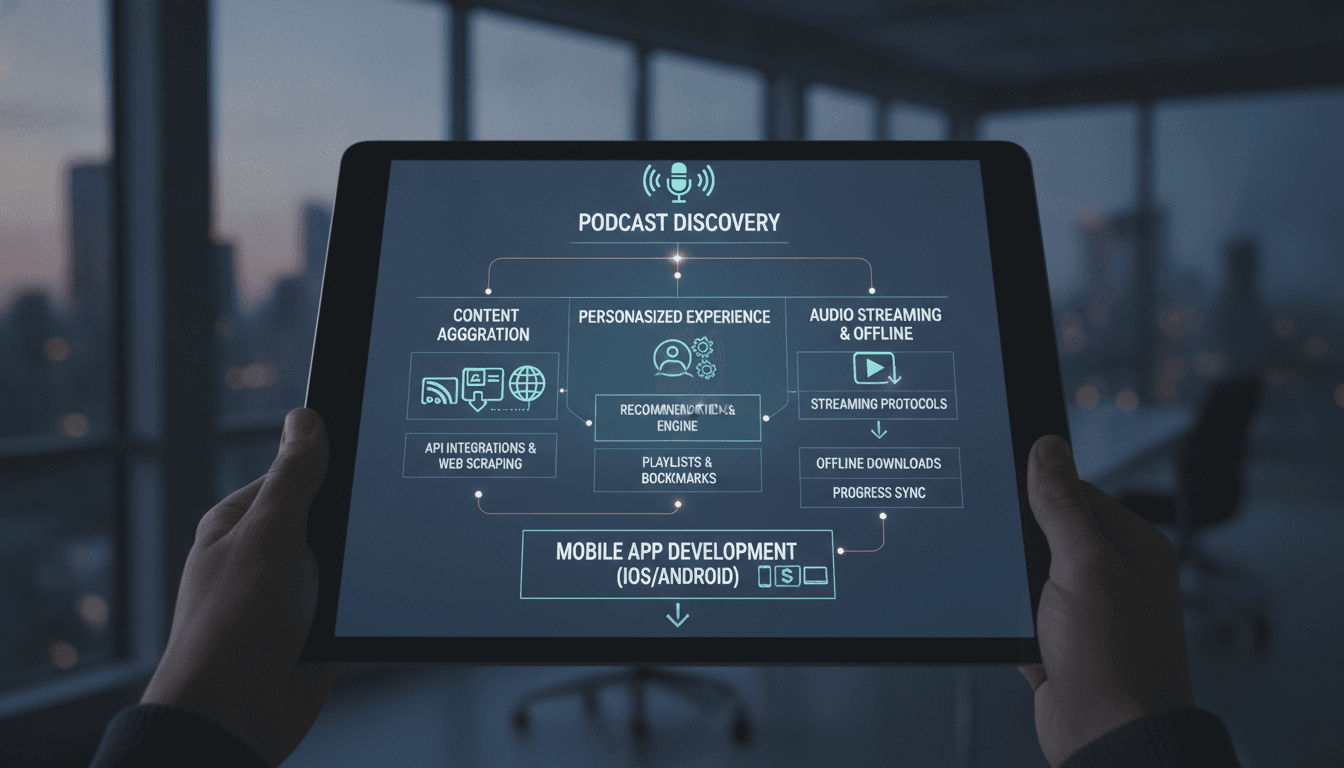
Stitcher was one of the earliest apps to treat podcasts as a curated, personalized media stream rather than a list of RSS feeds. Its core value proposition rested on three pillars:
- Aggregation — one place for tens of thousands of shows across every genre.
- Personalization — recommendation engines and custom playlists ("stitching" episodes together into a continuous listening queue).
- Convenience — offline downloads, cross-device sync, car integrations, and playback controls tuned for commuters.
Any app you build in this space needs to match those table stakes before it can differentiate.
Step 1: Define Your Niche and Positioning
The podcast app market is crowded — Spotify, Apple Podcasts, Pocket Casts, Overcast, Castbox, and dozens more. Competing head-on as a generic aggregator is expensive and difficult. Successful newcomers usually pick an angle:
- Genre-specific apps — true crime, business, sports, or faith-based content.
- Regional or language-specific platforms — underserved markets with local creators.
- Creator-first platforms — better analytics, monetization, and hosting for podcasters.
- AI-enhanced listening — transcription, summarization, semantic search inside audio.
- Audio learning — courses, micro-lessons, and knowledge content with progress tracking.
Decide early, because your niche shapes your content acquisition strategy, your recommendation logic, and your monetization model.
Related reading: How to Make an App Like Overcast.
Step 2: Map the Core Feature Set
User-Facing Features
Onboarding and Personalization
- Social/email sign-up and guest browsing
- Interest and genre selection to seed recommendations
- Import existing subscriptions via OPML
Discovery and Search
- Browse by category, trending, editor's picks, and new releases
- Full-text search across show titles, descriptions, and (ideally) episode transcripts
- Personalized "For You" feed powered by listening history
Playback Engine
- Background and lock-screen playback
- Variable speed (0.5x to 3x), skip silence, volume normalization
- Sleep timer, chapter markers, and skip-forward/back intervals
- Resume playback exactly where the user left off, across devices
Library Management
- Subscriptions and follow lists
- Custom playlists and smart queues that auto-populate with new episodes
- Offline downloads with storage management and auto-delete rules
- Bookmarks, favorites, and "listen later" saves
Social and Engagement
- Ratings, reviews, and comments
- Share episodes with timestamps
- Push notifications for new episodes from followed shows
Cross-Device and Integrations
- CarPlay and Android Auto
- Wear OS and watchOS companions
- Chromecast, AirPlay, Sonos, Alexa, and Google Assistant
- Web player for desktop listening
Creator-Facing Features
If you want a two-sided platform, podcasters need their own dashboard:
- Show and episode submission (RSS ingest or direct upload)
- Audio hosting and transcoding
- Analytics: downloads, completion rates, listener geography, drop-off points
- Monetization tools: dynamic ad insertion, subscriptions, tipping
Admin Panel
- Content moderation and takedown workflows
- Catalog curation and featured placements
- User management, subscription billing, and refunds
- Ad campaign management and reporting
- Platform-wide analytics dashboards
Step 3: Solve Content Acquisition
This is the make-or-break question that most teams underestimate. There are three main routes:
1. RSS Feed Ingestion Most podcasts are distributed via open RSS feeds. You can build a crawler that ingests, parses, and refreshes feeds on a schedule. This is how the majority of podcast apps populate their catalogs. You'll need robust parsing (feeds are notoriously inconsistent), deduplication, and change detection.
2. Podcast Directory APIs Services like Podcast Index, Listen Notes, Taddy, or Apple's iTunes Search API give you a ready-made catalog with metadata, artwork, and episode listings. Faster to launch, but usually metered or paid at scale.
3. Exclusive and Original Content Licensing or producing your own shows creates real differentiation and lock-in — but it's capital intensive. This is the Spotify/Wondery playbook.
Most apps start with option 1 or 2, then layer in option 3 once they have an audience.
Whatever you choose, respect creator rights: honor feed removal requests, attribute properly, and link back to the original show pages.
If this is relevant to your project, check out How to Make an App Like TuneIn.
Step 4: Design the Architecture
A podcast app looks simple on the surface but has real engineering depth underneath.
High-Level Components
Mobile Clients (iOS / Android) Native players using AVFoundation (iOS) and ExoPlayer/Media3 (Android), or a cross-platform layer like Flutter or React Native with native audio plugins. Native gives you the best control over background audio, buffering, and system integrations.
Backend API Layer A REST or GraphQL API handling authentication, subscriptions, playlists, playback position sync, and recommendations. Node.js, Go, or Python (FastAPI/Django) are all solid choices.
Ingestion Service A worker-based pipeline that polls RSS feeds, parses XML, normalizes metadata, extracts artwork, and writes to the catalog. Queue this with Kafka, RabbitMQ, or SQS and run it as a horizontally scalable set of workers.
Search Service Elasticsearch, OpenSearch, or Typesense for fast full-text and faceted search. Add a vector index (Pinecone, Weaviate, pgvector) if you want semantic search over transcripts.
Media Delivery Audio files are typically hosted by the podcaster, so you're often proxying or redirecting. For your own hosted content, use S3 or equivalent behind a CDN like CloudFront or Cloudflare, with HLS for adaptive streaming.
Recommendation Engine Start with collaborative filtering plus content-based similarity on categories and tags. Graduate to embedding-based models trained on listening sequences as your data grows.
Analytics Pipeline Playback events (start, pause, skip, complete) streamed into a data warehouse (BigQuery, Snowflake, Redshift) for both product analytics and creator-facing reporting. Follow IAB Podcast Measurement guidelines if you're reporting download numbers to advertisers.
Data Model Essentials
shows— title, description, artwork, categories, feed URL, publisherepisodes— show ID, title, audio URL, duration, publish date, chapters, transcriptusers— profile, preferences, subscription tiersubscriptions— user-to-show relationshipsplayback_positions— user, episode, timestamp, updated_at (critical for cross-device sync)playlistsandplaylist_itemsdownloads— local state mirrored server-side for cross-device awareness
Step 5: Nail the Playback Experience
This is where podcast apps win or lose users. A few hard-earned lessons:
- Buffering strategy matters. Pre-buffer aggressively on Wi-Fi, conservatively on cellular. Nothing kills retention like a stutter mid-episode.
- Handle interruptions gracefully. Phone calls, navigation prompts, and other audio sources must pause and resume cleanly.
- Sync playback position frequently but efficiently. Batch position updates every 15–30 seconds and on app background, not on every tick.
- Make downloads bulletproof. Resumable downloads, retry on network change, and clear storage indicators.
- Optimize the mini-player. Users spend more time in the persistent mini-player than any other UI element. Make it fast, responsive, and gesture-friendly.
Step 6: Choose Your Tech Stack
| Layer | Options |
|---|---|
| iOS | Swift, SwiftUI, AVFoundation |
| Android | Kotlin, Jetpack Compose, Media3/ExoPlayer |
| Cross-platform | Flutter (just_audio), React Native (react-native-track-player) |
| Backend | Node.js/NestJS, Go, Python FastAPI |
| Database | PostgreSQL (primary), Redis (cache/sessions) |
| Search | Elasticsearch, OpenSearch, Typesense |
| Queue | Kafka, RabbitMQ, AWS SQS |
| Storage/CDN | AWS S3 + CloudFront, Cloudflare R2 |
| Auth | Firebase Auth, Auth0, or custom JWT |
| Payments | Stripe, RevenueCat (for in-app subscriptions) |
| Analytics | Mixpanel, Amplitude, Segment, BigQuery |
| Push | Firebase Cloud Messaging, APNs |
Step 7: Add AI Where It Actually Helps
Modern listeners expect more than a play button. AI features that genuinely differentiate a podcast app include:
- Automatic transcription using Whisper or a managed speech-to-text service, unlocking search inside episodes.
- Episode summaries and chapter generation so users can decide whether to commit 90 minutes.
- Semantic search — "find me episodes about founder burnout" rather than keyword matching.
- Smart clipping — auto-detect quotable moments for social sharing.
- Personalized daily briefings that stitch together short segments from multiple shows.
- Multilingual dubbing to expand a show's reach into new markets.
Each of these adds compute cost, so pilot them on your top content before running them across your full catalog.
Step 8: Plan Monetization
Advertising Dynamic ad insertion (DAI) at pre-roll, mid-roll, and post-roll positions. Requires an ad server integration and careful measurement to satisfy advertisers.
Freemium Subscriptions Ad-free listening, offline downloads, higher audio quality, exclusive shows, and early access. Typically $4.99–$9.99/month.
Creator Subscriptions Let listeners pay individual podcasters directly; you take a platform cut. This aligns your incentives with creators and helps with content acquisition.
Hosting and Tools for Creators Charge podcasters for hosting, analytics, and distribution — a B2B revenue line that's less volatile than consumer subscriptions.
Sponsorships and Branded Content Curated playlists or channels sponsored by brands.
Step 9: Handle Legal and Compliance
- Copyright and DMCA — implement a clear takedown process and repeat-infringer policy.
- Podcast RSS terms — some feeds specify usage restrictions; honor them.
- App Store rules — Apple requires in-app purchase for digital subscriptions (with limited exceptions); Google has similar policies.
- Privacy — GDPR, CCPA, and consent management for listening data and ad targeting.
- Accessibility — transcripts, VoiceOver/TalkBack support, and adequate contrast aren't optional.
Development Timeline and Cost
A realistic breakdown for a production-quality podcast app:
| Phase | Duration |
|---|---|
| Discovery, research, and specs | 2–3 weeks |
| UX/UI design | 4–6 weeks |
| Backend and ingestion pipeline | 8–12 weeks |
| iOS and Android development | 10–16 weeks |
| Admin and creator dashboards | 4–6 weeks |
| QA, beta, and launch prep | 4–6 weeks |
Estimated costs:
- MVP (single platform, core playback and discovery): $40,000 – $70,000
- Full-featured app (iOS + Android + web + creator tools): $90,000 – $180,000
- Enterprise-grade platform with AI features and original content tooling: $200,000+
Add 15–20% annually for maintenance, plus ongoing infrastructure costs that scale with streaming volume.
MVP Recommendation
Don't build everything. A strong MVP for a Stitcher-style app includes:
- Sign-up and interest-based onboarding
- Catalog ingestion from RSS or a directory API
- Search and category browsing
- Subscribe/follow shows
- Solid background playback with speed control and sleep timer
- Offline downloads
- Cross-device playback position sync
- Push notifications for new episodes
Ship that, watch the retention curves, then invest in recommendations, social features, and creator tools based on what your data tells you.
Common Pitfalls to Avoid
- Underestimating feed parsing. RSS in the wild is messy. Budget real time for edge cases.
- Ignoring the car experience. A huge share of podcast listening happens while driving. CarPlay and Android Auto aren't nice-to-haves.
- Weak offline mode. Commuters lose signal. If downloads are unreliable, they churn.
- Over-notifying. Aggressive push notifications for every new episode will get your app muted or deleted.
- Neglecting battery and data usage. Audio apps run for hours. Inefficiency shows up fast in reviews.
Final Thoughts
Building an app like Stitcher is less about replicating a feature list and more about delivering a flawless listening experience with a reason to switch. The technical foundation — ingestion, playback, sync, search — has to be rock solid, because it's invisible when it works and infuriating when it doesn't. Your differentiation then comes from curation, personalization, creator relationships, or AI-driven capabilities that competitors haven't shipped yet.
Start narrow, obsess over playback quality, and grow the catalog and feature depth as your audience grows.
Have a project in mind? Contact Sodio Technologies to discuss your requirements and explore the right technology solution for your business.
/// Work with us
Talk to the engineers who'd build it
You'll get a technical scope, timeline and cost estimate from the people doing the work, not an account manager. In-house team, no subcontracting, since 2016.