

How to Make an App Like GIPHY World
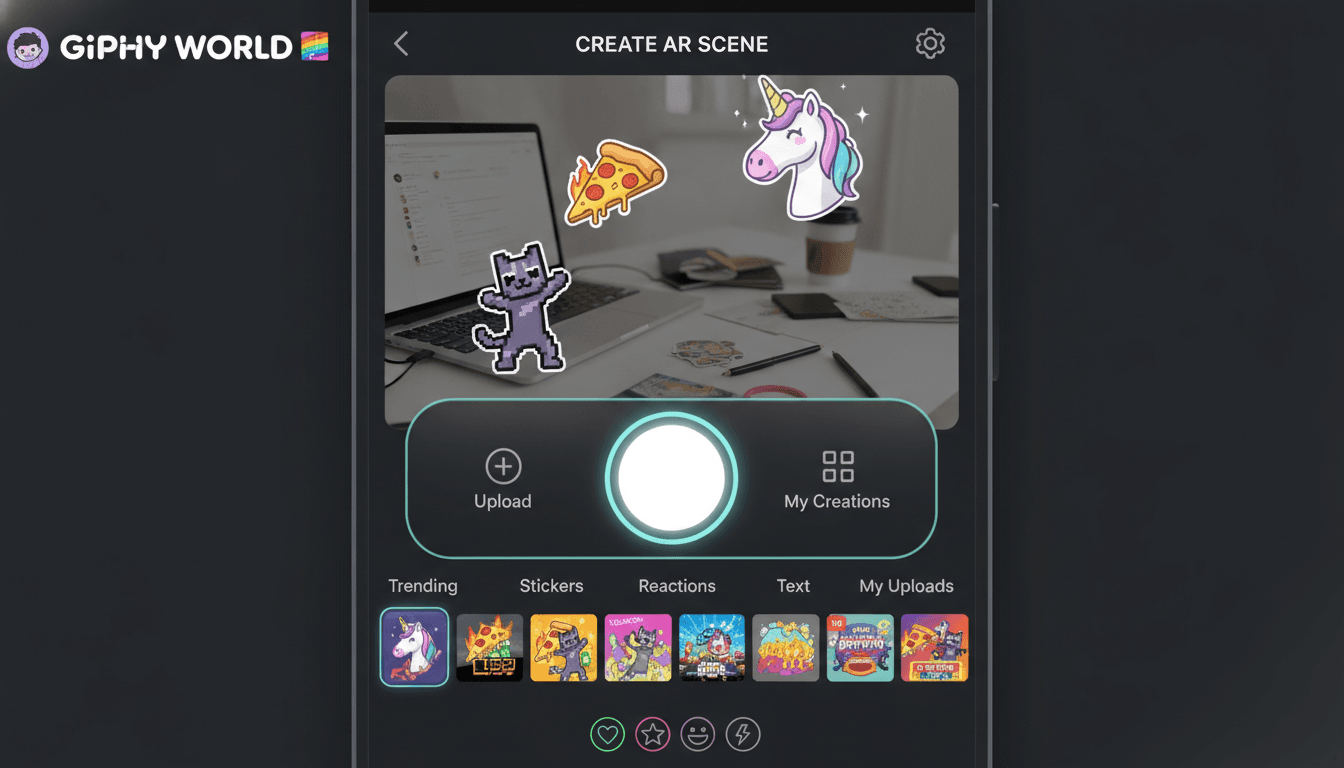
GIPHY World took something everyone already loved — GIFs and stickers — and dropped them into physical space through augmented reality. Users could place animated stickers on their desk, in their living room, or on a friend's shoulder, then capture the scene as a short video or photo to share. It was playful, shareable, and technically clever.
If you're planning to build an app in that space, here's what actually goes into it — from concept and feature set to the AR stack, content pipeline, and cost.
For a closer look at a related topic, read our guide on How to Make an App Like Snapchat AR.
What GIPHY World Actually Was
At its core, GIPHY World was an AR sticker camera. The app used your phone's rear camera to understand the room around you, let you browse a huge library of animated GIFs and stickers, and then anchored those animations to real surfaces and points in 3D space. Walk around them and they'd stay put. Record a clip and share it anywhere.
You may also find our article on How to Make an App Like WallaMe useful.
Three things made it work:
- A massive, well-tagged content library. GIPHY's existing GIF catalog was the moat.
- Frictionless AR. No markers, no calibration, no tutorial. Point and place.
- Native sharing. The output was a standard video or image file that worked everywhere.
Any clone or spiritual successor needs to nail all three. Great AR with a thin sticker library is a one-session app. A huge library with janky tracking is worse.
To explore this further, see How to Make an App Like JigSpace.
Step 1: Define Your Angle
"GIPHY World but for X" is a stronger starting point than a straight clone, because you won't have GIPHY's content catalog on day one. Some directions that work:
- Branded AR campaigns — sticker packs licensed to studios, sports teams, or musicians
- Event and venue overlays — geo-locked stickers at concerts, conferences, or stadiums
- Creator-first — let artists upload and sell their own animated AR stickers
- Messaging integration — AR capture as a feature inside an existing social or chat product
- Education or retail — AR annotation layered over real-world objects
Your angle determines everything downstream: content strategy, moderation load, monetization, and how much AR sophistication you actually need.
Step 2: Core Feature Set
Must-have (MVP)
| Feature | Why it matters |
|---|---|
| AR camera with surface detection | The whole product |
| Sticker/GIF browser with search | Discovery drives session length |
| Place, scale, rotate, delete objects | Basic manipulation is non-negotiable |
| Photo and video capture | The output is the point |
| Share sheet integration | Distribution loop |
| Onboarding + AR permissions flow | Camera permission drop-off is real |
Strong second wave
- Occlusion and people segmentation (stickers hide behind real objects and bodies)
- Face and body tracking for wearable stickers
- Multi-user shared AR sessions
- Persistent world anchors — leave a sticker somewhere, a friend finds it later
- User accounts, saved scenes, and a personal sticker library
- Trending and editorial sticker collections
- Creator upload pipeline with moderation
Nice to have
- Sound effects and music beds tied to stickers
- Templates and one-tap scenes
- Watermark and branding options
- In-app editing (trim, speed, filters)
Step 3: Pick Your AR Stack
This is the decision that shapes your whole engineering plan.
Native: ARKit (iOS) and ARCore (Android)
Best tracking quality, smallest binary, deepest access to platform features like LiDAR depth on newer iPhones, people occlusion, and body tracking. The tradeoff is you build and maintain two codebases.
Go native if AR quality is your differentiator and you can afford two teams.
Unity with AR Foundation
Unity's AR Foundation wraps ARKit and ARCore behind one API. You get a real 3D engine, a mature asset pipeline, particle systems, physics, and shaders for free. Most serious AR consumer apps ship on Unity.
The cost: larger app size (typically 40–80 MB baseline), a heavier build process, and awkwardness if you also need a lot of conventional native UI. Many teams solve this by embedding Unity as a library inside a native shell.
Cross-platform frameworks
React Native and Flutter can host AR views through native modules or wrappers, but the ecosystem is thinner and you'll end up writing native AR code anyway. Reasonable if AR is one feature in a larger app; poor if AR is the app.
Web AR
WebXR, 8th Wall, and similar platforms let you skip the app store entirely. Tracking is weaker and performance is capped, but for a campaign or one-off experience, the zero-install conversion rate is hard to argue with.
Recommendation for most teams: Unity + AR Foundation for the AR surface, native shell for everything else.
Step 4: The Content Pipeline
People underestimate this. A GIF is not an AR asset.
Format conversion. Animated GIFs need to become something a 3D engine can render efficiently — typically a texture atlas or sprite sheet applied to a billboarded quad, or a transparent video format like HEVC with alpha or VP9. Raw GIFs are large, badly compressed, and capped at 256 colors.
Transparency. Most GIFs have hard-edged binary transparency that looks awful floating in a real room. You'll want assets authored with proper alpha channels, or a pipeline that cleans up matte edges.
Delivery. Stickers should stream on demand, not ship in the bundle. That means a CDN, aggressive caching, thumbnail previews, and multiple resolution tiers so you're not pulling a 4K asset onto a mid-range Android phone.
Metadata and search. Tags, categories, trending signals, and a search index. If you're licensing from an API like GIPHY or Tenor, much of this comes with it — read the terms carefully, because attribution and commercial-use restrictions are real.
Moderation. If users upload content, you need automated screening plus a human review queue. Budget for it from the start.
Step 5: Backend Architecture
The client does the heavy lifting on rendering, but you still need a real backend:
- Content service — sticker catalog, search, collections, trending
- Asset CDN — global edge delivery for sticker files
- User service — auth, profiles, saved content, favorites
- Media service — optional cloud rendering, upload, and transcoding for shared captures
- Anchor service — if you're doing persistent or shared AR, you need cloud anchors (ARCore Cloud Anchors, Azure Spatial Anchors, or a custom solution)
- Analytics — session length, placements per session, capture rate, share rate
Standard choices work fine here: Node or Go services, Postgres for relational data, Redis for caching, S3 or equivalent behind CloudFront, Elasticsearch or Algolia for sticker search.
Step 6: UX Details That Make or Break It
Time to first sticker. Get the user placing something within ten seconds of opening the app. Skip the tutorial carousel. Teach through a single animated hint in the camera view.
Surface detection feedback. Show a subtle grid or reticle so users understand the app has found the floor. Ambiguity here causes immediate abandonment.
Thumb-reachable controls. The sticker drawer, capture button, and undo all need to live in the bottom third of the screen. People hold phones one-handed in AR more than you'd expect.
Graceful degradation. Not every device supports occlusion or LiDAR. Detect capability at runtime and fall back cleanly rather than blocking the user.
Capture that works. Recording AR video is technically fiddly — you're compositing the camera feed with rendered content at a stable frame rate while the device is already thermally stressed. Test this on old hardware. It's the most common failure point.
Step 7: Performance and Device Reality
AR is one of the most demanding things a phone can do. Camera, CPU, GPU, IMU, and often the neural engine all run simultaneously.
Practical constraints:
- Target 30 FPS minimum, 60 where possible
- Cap simultaneous animated stickers (10–20 is a reasonable ceiling)
- Pool and reuse objects instead of instantiating per placement
- Compress textures with platform-native formats (ASTC, ETC2)
- Watch thermal throttling — sustained AR sessions heat devices fast, and frame rate falls off a cliff after a few minutes
- Test on low-end Android, not just flagship iPhones. The Android AR device fragmentation problem is severe.
Step 8: Monetization
Options, roughly in order of how well they tend to work for this category:
- Premium sticker packs — in-app purchase for themed or licensed collections
- Subscription — unlimited packs, no watermark, higher export quality
- Brand partnerships — sponsored sticker packs and campaign activations
- Creator marketplace — revenue share on user-made stickers
- Ads — rewarded video to unlock packs; interstitials generally hurt AR apps badly
GIPHY World itself was a distribution and brand play rather than a direct revenue product. If you don't have that luxury, build the monetization surface into the design from the beginning rather than bolting it on.
Timeline and Cost
Rough planning numbers for a competent team:
MVP (3–4 months): AR camera, surface placement, sticker library of a few hundred assets, capture and share, basic search. Single platform. Typically $50,000–$90,000.
Production v1 (6–8 months): Both platforms, accounts, cloud content pipeline, occlusion, face tracking, moderated creator uploads, analytics, monetization. Typically $120,000–$250,000.
Scale (ongoing): Shared sessions, persistent anchors, licensing deals, content ops, and infrastructure. This becomes a real ongoing cost line, not a project.
Ranges vary widely with team location, content licensing costs, and how much original sticker art you commission.
Common Mistakes
- Shipping with a thin library. Novelty wears off in two sessions without content depth.
- Ignoring Android. Half your market, and the harder half technically.
- Overbuilding AR before validating the loop. Prove people want to place and share stickers before you build persistent multiplayer world anchors.
- Forgetting the share output. If the exported video is low resolution or oddly cropped for social platforms, nobody posts it — and if nobody posts it, you have no growth loop.
- No content ops plan. Trending stickers need weekly curation. That's a person's job, not a cron job.
Getting Started
Build the smallest thing that proves the loop: open camera, place animated sticker, record, share. Put it in front of twenty people. Watch where they hesitate, where they laugh, and whether they actually post the result.
Everything else — the creator marketplace, the shared sessions, the licensed brand packs — is a layer on top of that core moment working. If placing a sticker doesn't feel magical in the first ten seconds, no amount of feature depth will save it.
Have a project in mind? Contact Sodio Technologies to discuss your requirements and explore the right technology solution for your business.
/// Work with us
Talk to the engineers who'd build it
You'll get a technical scope, timeline and cost estimate from the people doing the work, not an account manager. In-house team, no subcontracting, since 2016.