

How to Make an App Like Microsoft Cortana
How to Make an App Like Microsoft Cortana
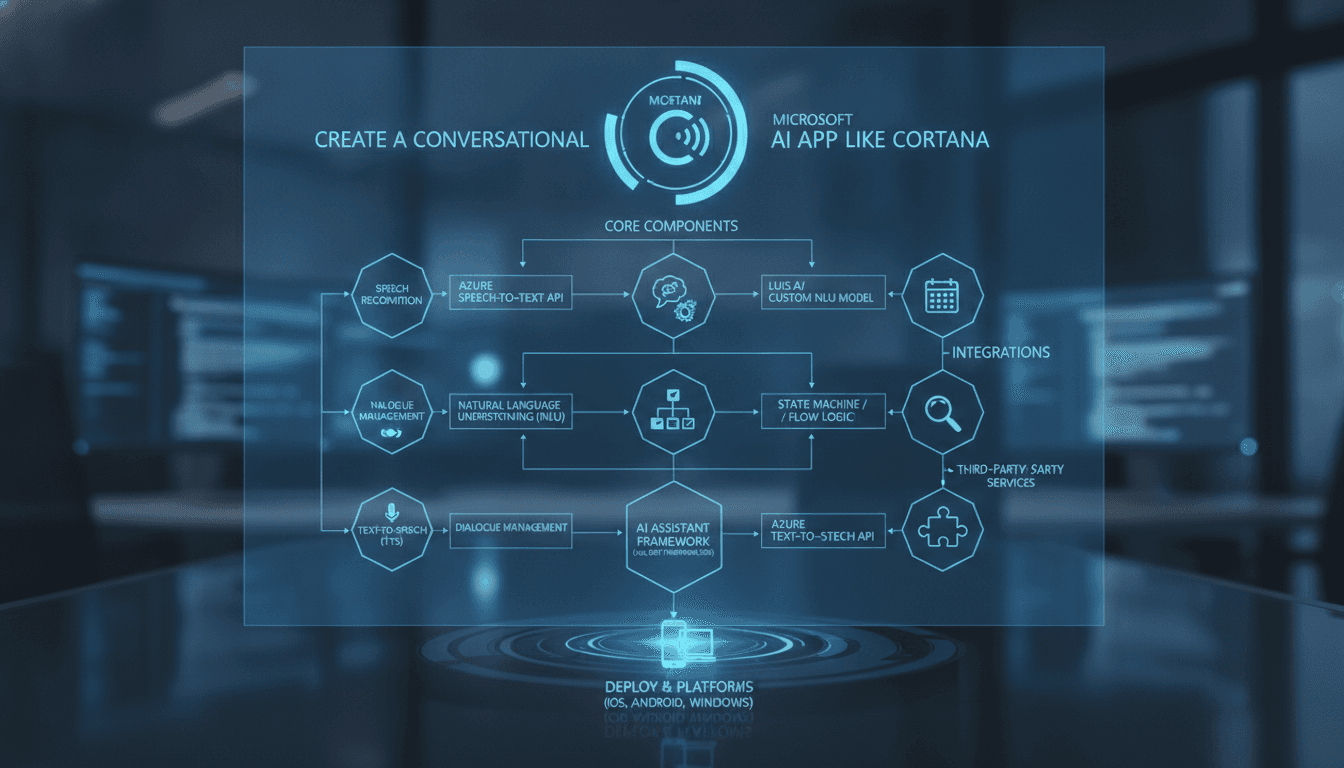
Artificial intelligence-powered virtual assistants have transformed the way we interact with technology. From setting reminders to answering complex questions, apps like Microsoft Cortana have set a high bar for intelligent, conversational experiences. If you're wondering how to build a similar app, you're in the right place. This guide walks you through everything — from core features and technology stacks to development steps and cost considerations.
What Is Microsoft Cortana?
Microsoft Cortana is an AI-powered virtual assistant developed by Microsoft. Originally launched in 2014, Cortana can perform a wide range of tasks including:
- Answering natural language questions
- Setting reminders and alarms
- Managing calendars and emails
- Searching the web
- Integrating with third-party apps and services
- Providing personalized recommendations
Cortana leverages Natural Language Processing (NLP), Machine Learning (ML), and cloud computing to deliver a seamless, intelligent experience across devices.
You may also find our article on How to Make an App Like Mycroft useful.
Why Build a Virtual Assistant App?
The virtual assistant market is booming. According to industry reports, the global intelligent virtual assistant market is projected to reach $50+ billion by 2030, driven by growing demand across consumer and enterprise sectors. Businesses are investing in virtual assistants to:
- Improve customer support and engagement
- Automate repetitive tasks
- Enhance productivity for employees
- Deliver personalized user experiences
- Reduce operational costs
Whether you're targeting individual consumers or enterprise clients, a Cortana-like app represents a massive business opportunity.
You may also find our article on How to Make an App Like Hound useful.
Core Features of a Cortana-Like App
Before diving into development, you need to define the features your virtual assistant will offer. Here are the must-have capabilities:
1. Natural Language Understanding (NLU)
The app should understand what users say or type in plain, conversational language — not just predefined commands. This requires robust NLP models capable of parsing intent and extracting entities.
2. Voice Recognition
Voice input is central to any virtual assistant. Your app should accurately convert spoken words into text using Automatic Speech Recognition (ASR) technology, even in noisy environments.
3. Text-to-Speech (TTS)
The assistant should respond audibly in a natural-sounding voice. High-quality TTS engines can generate responses that feel human-like rather than robotic.
4. Contextual Awareness
A great assistant remembers the context of a conversation. If a user asks "What about tomorrow?" after asking about weather, the app should understand "tomorrow" refers to the weather forecast.
5. Task Automation
Users should be able to set reminders, create calendar events, send messages, play music, and more — all through conversational commands.
6. Personalization
The app should learn user preferences over time and offer personalized responses and recommendations.
7. Third-Party Integrations
Integrations with apps like Google Calendar, Outlook, Spotify, and smart home devices (IoT) greatly extend the assistant's utility.
8. Multi-Platform Support
Your assistant should work across iOS, Android, web, and potentially desktop — just like Cortana does.
9. Security & Privacy Controls
Since the app will handle sensitive user data, robust security features and transparent privacy controls are non-negotiable.
10. Analytics Dashboard (For Enterprise)
For business-focused assistants, an analytics dashboard to monitor usage, intent accuracy, and user satisfaction is a valuable addition.
Technology Stack for Building a Virtual Assistant App
Choosing the right technology stack is critical. Here's a breakdown of what you'll need:
AI & Machine Learning
| Component | Tools/Frameworks |
|---|---|
| NLP Engine | Google Dialogflow, Rasa, IBM Watson, Amazon Lex |
| Machine Learning | TensorFlow, PyTorch, scikit-learn |
| Speech Recognition | Google Speech-to-Text, Azure Cognitive Services, DeepSpeech |
| Text-to-Speech | Google Text-to-Speech, Amazon Polly, Azure Neural TTS |
Backend Development
- Programming Languages: Python, Node.js, Java
- Frameworks: FastAPI, Express.js, Spring Boot
- Database: PostgreSQL, MongoDB, Firebase
- Cloud Platform: AWS, Google Cloud, Microsoft Azure
Frontend & Mobile Development
- Mobile (Cross-Platform): Flutter, React Native
- Mobile (Native): Swift (iOS), Kotlin (Android)
- Web Frontend: ReactJS, Angular
DevOps & Infrastructure
- Containerization: Docker, Kubernetes
- CI/CD: GitHub Actions, Jenkins
- Monitoring: Datadog, New Relic
Step-by-Step Guide to Building a Cortana-Like App
Step 1: Define Your Use Case and Target Audience
Not every virtual assistant needs to do everything. Start by identifying:
- Who your users are (consumers, enterprise employees, etc.)
- What primary tasks the assistant will handle
- Which platforms you'll target first
Narrowing your focus allows you to build a more effective MVP (Minimum Viable Product) before expanding.
Step 2: Choose Your NLP Engine
You have two broad options:
Use a Pre-Built NLP Platform Platforms like Google Dialogflow, Amazon Lex, or Microsoft Azure Bot Service provide pre-trained models, reducing development time significantly. They're ideal for faster go-to-market timelines.
Build a Custom NLP Model If you need greater control, accuracy, or want to train on domain-specific data (e.g., medical or legal contexts), building a custom model using Rasa or Hugging Face Transformers is the way to go. This requires more time and ML expertise.
Step 3: Design Conversational Flows
Map out the conversations your assistant will have. Use tools like Botmock, Voiceflow, or Lucidchart to create conversation flow diagrams. Consider:
- Happy paths (ideal conversations)
- Edge cases and fallback responses
- Multi-turn dialogue handling
- Error recovery strategies
Step 4: Build the Backend
Your backend is the brain of the operation. It should:
- Receive and process user inputs
- Communicate with the NLP engine
- Execute actions (API calls, database queries)
- Return responses to the frontend
Use a microservices architecture to keep individual components (speech recognition, NLP, integrations) independently scalable and maintainable.
We cover a closely related subject in How to Make an App Like Braina.
Step 5: Implement Speech Recognition and TTS
Integrate ASR and TTS services into your app. Test extensively for:
- Accuracy across different accents and dialects
- Performance in low-connectivity environments
- Latency (response speed is critical for a good UX)
Step 6: Develop the Frontend / Mobile App
Build the user interface for each target platform. Key UI/UX considerations include:
- A clean, minimal design that doesn't distract from the conversation
- Clear visual indicators when the assistant is listening, processing, or speaking
- Easy access to conversation history
- Accessibility features for users with disabilities
Step 7: Integrate Third-Party Services
Connect your assistant with relevant APIs and platforms:
- Calendar APIs (Google Calendar, Outlook)
- Communication APIs (Twilio for SMS/calls)
- Smart Home (Google Home, Amazon Alexa ecosystem)
- Music Streaming (Spotify, Apple Music)
- E-Commerce (for shopping-related commands)
Step 8: Train and Refine Your AI Model
Deploy a beta version and collect real user interaction data. Use this data to:
- Identify misunderstood intents
- Add missing training phrases
- Improve entity recognition
- Reduce false positives and negatives
AI model training is an ongoing process — plan for continuous improvement post-launch.
Step 9: Test Rigorously
Testing a virtual assistant involves more than standard QA. You'll need to test:
- Functional Testing: Does each feature work as expected?
- NLP Accuracy Testing: Are intents and entities correctly identified?
- Voice Testing: Does speech recognition work across devices and environments?
- Performance Testing: Can the system handle concurrent users at scale?
- Security Testing: Is user data properly encrypted and protected?
Step 10: Launch and Iterate
Deploy your app to the App Store, Google Play, and/or web. Monitor performance metrics closely:
- Intent recognition accuracy rate
- Task completion rate
- User retention and engagement
- Average session duration
- User satisfaction (NPS scores, reviews)
Use these insights to drive your product roadmap and continuously improve the assistant.
How Much Does It Cost to Build a Virtual Assistant App?
Development costs vary widely depending on complexity, team size, and location. Here's a rough estimate:
| Component | Estimated Cost |
|---|---|
| UI/UX Design | $5,000 – $15,000 |
| NLP & AI Development | $20,000 – $60,000 |
| Backend Development | $15,000 – $40,000 |
| Mobile App Development | $20,000 – $50,000 |
| Third-Party Integrations | $5,000 – $20,000 |
| Testing & QA | $5,000 – $15,000 |
| Total Estimated Cost | $70,000 – $200,000+ |
Enterprise-grade assistants with advanced AI, deep integrations, and multi-platform support can exceed these figures. Ongoing maintenance and AI model training add to the total cost of ownership.
Key Challenges to Anticipate
Building a virtual assistant is exciting but comes with real challenges:
- Accuracy at Scale: NLP models degrade in accuracy with unusual inputs or niche domains. Plan for robust training data.
- Latency: Users expect near-instant responses. Optimizing inference speed is crucial.
- Privacy Regulations: Compliance with GDPR, CCPA, and other data privacy laws is mandatory.
- Voice in Noisy Environments: ASR performance drops in loud or echo-prone environments.
- Multilingual Support: Supporting multiple languages dramatically increases complexity and cost.
Final Thoughts
Building an app like Microsoft Cortana is a complex but highly rewarding endeavor. The key ingredients are a well-defined use case, a robust NLP engine, a scalable backend, and a relentless focus on user experience. Start lean with an MVP, gather real user feedback, and iterate your way to a world-class virtual assistant.
Whether you're a startup looking to disrupt the market or an enterprise aiming to boost internal productivity, the right development partner can make all the difference. Partnering with an experienced AI and mobile app development team ensures your vision is executed efficiently, on time, and within budget.
Ready to build your own AI-powered virtual assistant? Get in touch with our team today to discuss your project requirements and get a free consultation.
Have a project in mind? Contact Sodio Technologies to discuss your requirements and explore the right technology solution for your business.
/// Work with us
Talk to the engineers who'd build it
You'll get a technical scope, timeline and cost estimate from the people doing the work, not an account manager. In-house team, no subcontracting, since 2016.