

How to Make an App Like Smiling Mind
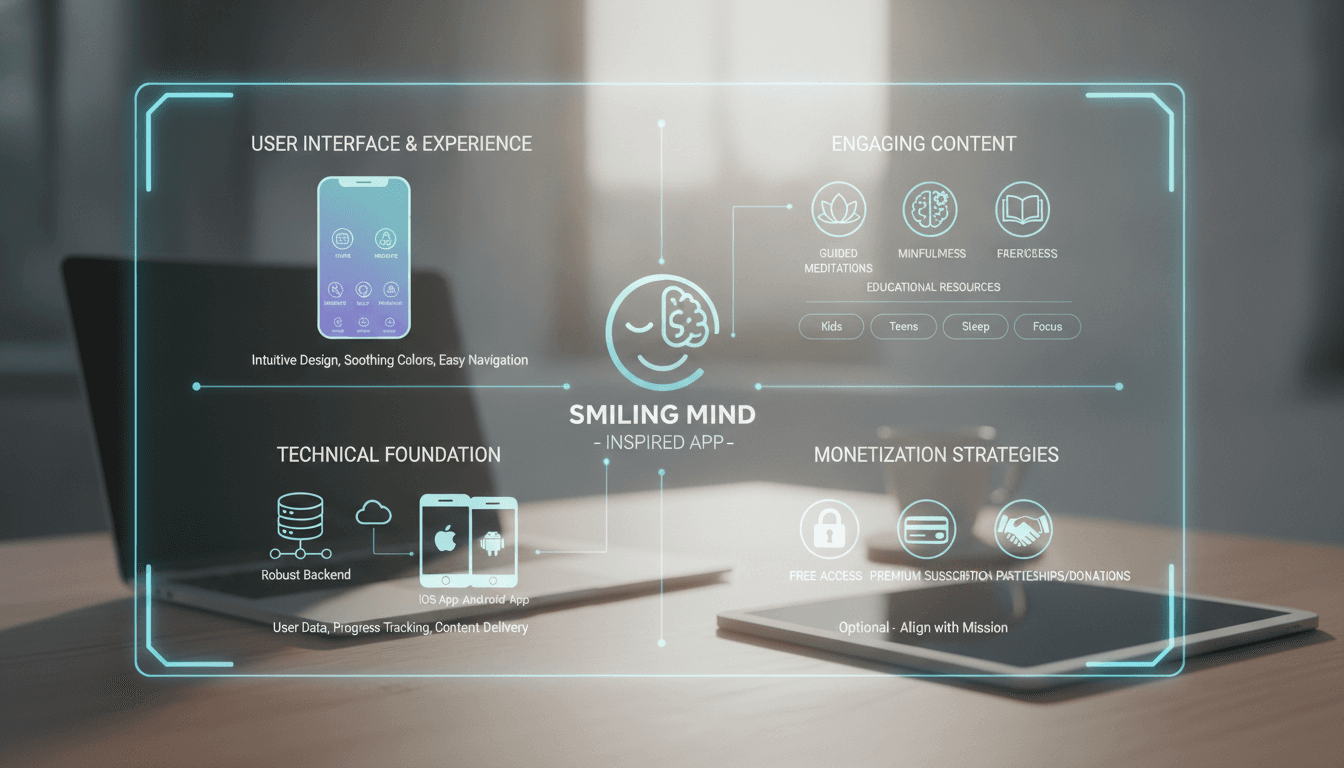
How to Make an App Like Smiling Mind
Mental health has moved from a whispered conversation to a mainstream priority, and mindfulness apps sit right at the centre of that shift. Smiling Mind — a not-for-profit meditation app built by psychologists and educators — has been downloaded millions of times and is used in classrooms, workplaces, and living rooms across the world.
If you're planning to build something similar, this guide walks you through what actually goes into creating a mindfulness and meditation app: the features that matter, the tech stack that supports them, the compliance you can't skip, and the realistic costs and timelines involved.
We cover a closely related subject in How to Make an App Like Breethe.
What Makes Smiling Mind Work
Before writing a single line of code, it's worth understanding why Smiling Mind resonated in the first place. It isn't the flashiest meditation app on the market, and that's rather the point.
For a closer look at a related topic, read our guide on How to Make an App Like Moodpath.
Evidence-based content. Every program is developed by psychologists and grounded in clinical research rather than wellness trends. Users trust it because there's substance behind the soothing voice.
Age-appropriate programming. Smiling Mind segments content for children as young as three, teens, adults, and educators. A seven-year-old and a stressed-out project manager need very different meditations.
Genuinely free. No paywall halfway through a breathing exercise. The not-for-profit model removed a huge point of friction and built enormous goodwill.
Institutional distribution. By building dedicated programs for schools and workplaces, Smiling Mind got itself embedded into daily routines rather than fighting for attention on a crowded app store.
Whatever your monetisation model, those four pillars — credibility, personalisation, low friction, and distribution — are what you're really trying to replicate.
Step 1: Define Your Niche and Positioning
The meditation app space is crowded. Headspace, Calm, Insight Timer, and dozens of others already compete for general mindfulness users. Success now comes from specificity.
If this is relevant to your project, check out How to Make an App Like Happify.
Consider narrowing into one of these directions:
- Youth and education — classroom-ready programs, teacher dashboards, curriculum alignment
- Workplace wellbeing — team analytics, HR integrations, short desk-friendly sessions
- Clinical adjunct — CBT and ACT-informed modules that complement therapy
- Sleep and recovery — soundscapes, wind-down routines, wearable integration
- Culturally specific mindfulness — content in underserved languages or traditions
- Condition-specific support — anxiety, ADHD, chronic pain, postnatal wellbeing
Pick one, dominate it, then expand. A focused app with 50,000 devoted users beats a generic one with 500,000 lapsed installs.
Step 2: Map Your Core Feature Set
Must-Have Features (MVP)
Onboarding and goal setting A short questionnaire covering stress levels, sleep quality, experience with meditation, and goals. Use this to generate a starting recommendation rather than dumping users into an unstructured library.
Structured programs, not just sessions Multi-day courses ("7 Days to Better Sleep," "Mindfulness for Year 5") create a sense of progression. This is the single biggest differentiator between apps people finish and apps people abandon.
Audio player built for meditation Background playback, lock-screen controls, offline downloads, resume-where-you-left-off, adjustable bell intervals, and gentle fade-outs. Nothing breaks a calm moment like a buffering spinner.
Progress tracking and streaks Total minutes practised, sessions completed, current streak. Keep gamification gentle — aggressive streak-shaming is antithetical to a mindfulness product.
Mood check-ins A quick pre- and post-session mood log. It's low effort for users and gives you the outcome data that makes your app credible.
Reminders and notifications Customisable, respectful, and easy to switch off. Let users pick their own practice window.
Accessibility Screen reader support, transcripts and captions for every audio session, dynamic type, and high-contrast modes. In wellbeing apps this is a baseline expectation, not a nice-to-have.
Features for Version Two and Beyond
- Personalised recommendations driven by usage patterns and mood data
- Breathing exercises with animated visual guides and haptics
- Journalling and gratitude prompts
- Wearable integration (Apple Health, Google Fit, Fitbit) for HRV and sleep correlation
- Educator and employer dashboards with anonymised, aggregate engagement data
- Community features — group challenges, shared programs, anonymous check-ins
- Downloadable soundscapes and ambient mixers
- Multi-language content and localised voice talent
- AI-generated session recommendations or adaptive program pacing
Step 3: Get the Content Strategy Right
This is where most mindfulness apps quietly fail. The software is the easy part; the content is the product.
Work with credentialed practitioners. Registered psychologists, mindfulness-based stress reduction (MBSR) instructors, and for youth content, education specialists. Their names and credentials should be visible in the app — it's a trust signal.
Budget properly for production. Professional voice talent, a treated recording space, and proper mastering. Compare a well-produced session to an amateur one and the difference in perceived quality is enormous.
Plan your content pipeline. You need a repeatable process: script writing, clinical review, recording, editing, metadata tagging, and CMS upload. Build this workflow before you scale.
Launch with enough depth. Roughly 40–60 sessions across three or four programs is a reasonable minimum. Fewer than that and users exhaust the library before the habit forms.
Tag everything. Duration, theme, difficulty, age group, narrator, mood target. Rich metadata is what makes personalised recommendations possible later.
Step 4: Choose Your Technology Stack
Mobile Front End
Cross-platform — Flutter or React Native lets you ship iOS and Android from one codebase, which typically cuts development cost by 30–40%. For a content-and-audio app like this, cross-platform is usually the right call.
Native — Swift and Kotlin make sense if you're doing heavy work with background audio, wearables, HealthKit, or complex animations, and you want maximum polish.
Back End
- Runtime: Node.js, Python (Django/FastAPI), or Go
- Database: PostgreSQL for relational user and content data, Redis for caching and session state
- Content management: A headless CMS such as Strapi, Contentful, or Sanity so your content team can publish without developer involvement
- Media delivery: Object storage (S3 or equivalent) fronted by a CDN, with adaptive bitrate streaming (HLS) and DRM or signed URLs to protect premium audio
- Auth: OAuth 2.0 with social sign-in, plus SSO (SAML/OIDC) if you're selling to schools or enterprises
Supporting Services
- Analytics: Mixpanel, Amplitude, or a self-hosted alternative for privacy-sensitive deployments
- Push notifications: Firebase Cloud Messaging or OneSignal
- Payments: Apple and Google in-app purchase for consumer subscriptions; Stripe for B2B contracts
- Crash and performance monitoring: Sentry, Firebase Crashlytics
- Infrastructure: AWS, Google Cloud, or Azure with infrastructure-as-code and CI/CD pipelines
Step 5: Take Privacy and Compliance Seriously
Mental health data is among the most sensitive category of personal information there is. Get this wrong and you don't just face fines — you lose the trust that your entire product depends on.
Know which regimes apply. GDPR in the EU and UK, HIPAA if you're operating in a clinical capacity in the US, the Australian Privacy Act and APPs, and COPPA plus equivalents if you're serving children.
Children's data needs special handling. Verifiable parental consent, no behavioural advertising, minimal data collection, and clear separation between child and adult accounts.
Encrypt everything. TLS 1.3 in transit, AES-256 at rest, and encrypted local storage for cached journals and mood logs.
Practise data minimisation. If you don't need it, don't collect it. Offer anonymous or local-only modes where feasible.
Be transparent. A plain-language privacy policy, granular consent toggles, easy data export, and genuine account deletion.
Add crisis safeguards. If a user logs severe distress, surface region-appropriate crisis helplines. Include clear disclaimers that the app is not a replacement for professional care.
Consider regulatory classification. Depending on the claims you make, your app could be classed as a medical device in some jurisdictions. Get legal advice before making therapeutic claims.
Step 6: Design for Calm
UI/UX carries unusual weight in this category. The interface itself has to feel like the outcome you're promising.
- Restrained colour palettes — soft, desaturated tones; avoid high-alert reds and harsh contrasts
- Generous whitespace — clutter creates cognitive load, which is precisely the opposite of the goal
- Smooth, slow motion — animations that ease rather than snap
- Minimal decisions — one clear recommended action on the home screen, library browsing secondary
- Dark mode — essential for evening and bedtime use
- Large touch targets — people use these apps half-asleep or with tired eyes
- Encouraging, non-judgemental copy — "Welcome back" rather than "You missed three days"
Step 7: Pick a Monetisation Model
Freemium subscription — The industry standard. A free tier with core sessions, premium unlocking the full library, offline downloads, and advanced features. Typical pricing sits around $10–15 monthly or $60–100 annually.
B2B licensing — Sell to schools, universities, and employers on a per-seat annual contract. Higher deal values, longer sales cycles, and far lower churn than consumer subscriptions. This is often where the real revenue lives.
Not-for-profit and grant funded — The Smiling Mind approach. Philanthropic funding, government grants, and corporate partnerships keep the app free. Slower to scale but builds unmatched credibility and reach.
Hybrid — Free for individuals, paid for institutions. Increasingly the most popular structure in this space.
Step 8: Development Timeline and Cost
Every project differs, but here's a realistic frame for a cross-platform mindfulness app.
Discovery and design — 4 to 6 weeks Research, user personas, feature prioritisation, wireframes, and a full UI kit.
MVP development — 12 to 20 weeks Core app, back end, CMS, audio infrastructure, payments, and analytics.
Content production — runs in parallel, 8 to 16 weeks Scripting, clinical review, recording, editing, and tagging.
QA and beta — 3 to 5 weeks Device matrix testing, accessibility audit, security review, and a closed beta with real users.
Launch and iteration — ongoing App store submission, marketing, and a continuous release cadence.
Indicative budgets:
- Simple MVP (cross-platform, limited content): $45,000 – $80,000
- Mid-range app (personalisation, wearables, richer library): $80,000 – $160,000
- Full platform (B2B dashboards, multi-language, AI features): $160,000 – $350,000+
Add content production costs on top — professional audio typically runs $300–1,000 per finished session depending on talent and length. Ongoing costs including hosting, CDN, content refresh, and maintenance usually land at 15–25% of initial build cost annually.
Step 9: Launch and Grow
Seed institutional partnerships early. A pilot with three schools or one mid-sized employer gives you testimonials, usage data, and a reference customer before public launch.
Invest in App Store optimisation. Keywords like "meditation for kids," "mindfulness at work," and "anxiety relief" carry real search volume. Your screenshots and preview video matter more than most founders expect.
Publish your evidence. Aggregate outcome data, partner with a university for a small efficacy study, and make the results public. In mental health, credibility is the marketing.
Nurture the first week hard. Day one, three, and seven are where you lose most users. A well-designed seven-day starter program with gentle nudges is the highest-leverage retention work you can do.
Measure what matters. Not just downloads — track weekly active users, sessions per active user, program completion rate, 30-day retention, and self-reported mood change.
Common Mistakes to Avoid
- Building the app before the content. You'll end up with a beautiful shell and nothing worth opening it for.
- Over-gamifying. Streak anxiety in a mindfulness app is an own goal.
- Ignoring accessibility. You're excluding a meaningful share of the people who most need the product.
- Making unsupported clinical claims. It's a regulatory risk and it undermines trust.
- Treating notifications as a growth lever. Push too hard and you'll be uninstalled, not converted.
- Neglecting offline mode. People meditate on planes, in parks, and in basements with no signal.
Final Thoughts
Building an app like Smiling Mind is less a software challenge than a trust challenge. The technical stack is well trodden — audio streaming, subscriptions, and progress tracking are solved problems. What separates the apps people keep from the ones they delete is clinical rigour, thoughtful content, respectful design, and a genuine understanding of who you're serving.
Start narrow, work with real practitioners, treat user data as the sensitive material it is, and design every screen to leave someone calmer than they arrived. Do that, and the technology will do its job quietly in the background — which, for this kind of app, is exactly where it belongs.
Have a project in mind? Contact Sodio Technologies to discuss your requirements and explore the right technology solution for your business.
/// Work with us
Talk to the engineers who'd build it
You'll get a technical scope, timeline and cost estimate from the people doing the work, not an account manager. In-house team, no subcontracting, since 2016.