

How to Make an App Like Weather Live
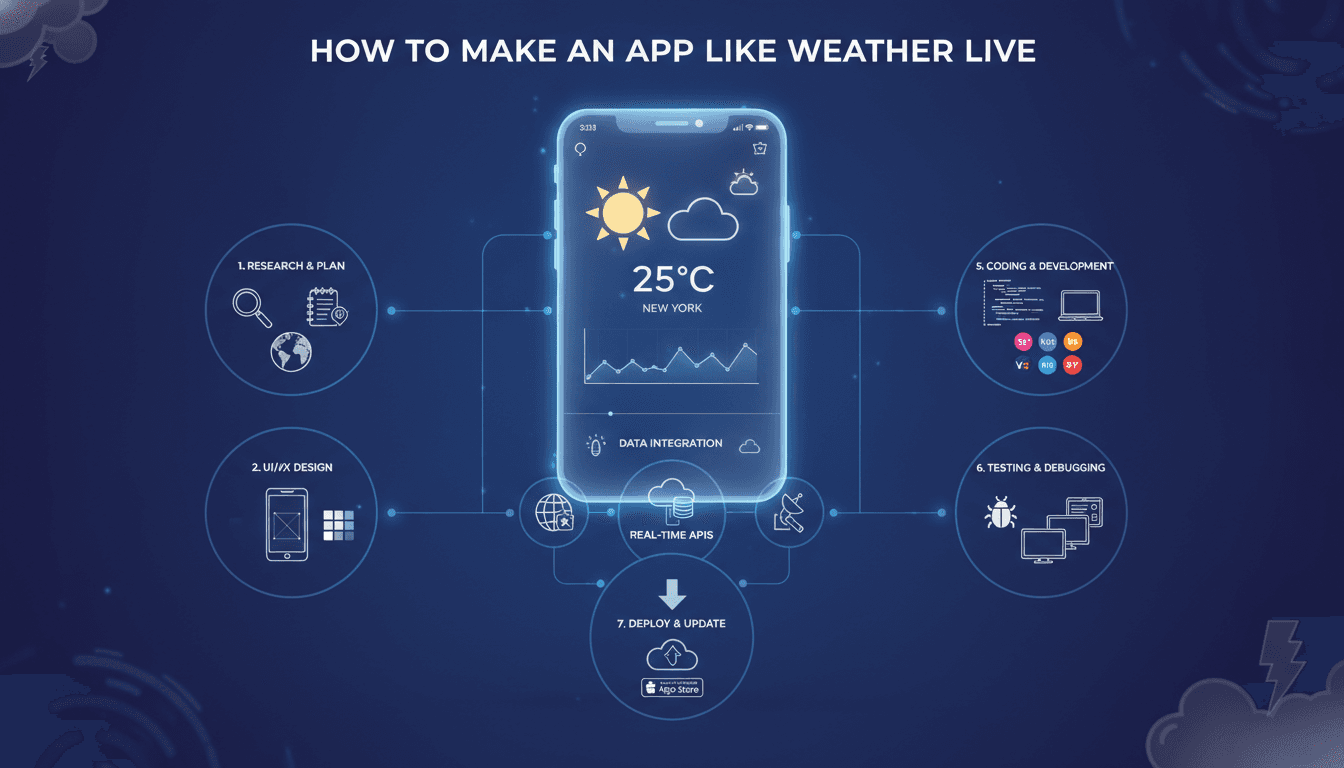
A practical breakdown of the architecture, data sources, and engineering decisions behind a full-featured weather app — written for teams who want to build something that actually holds up at scale.
What Does a Weather App Like Weather Live Actually Do?
Weather Live sits in a crowded category, but it earns its users by doing a few things well: hyper-local forecasts, animated radar maps, severe weather alerts, and a UI that renders quickly even on mid-range Android devices. If you want to build something comparable, you need to understand what's happening under the hood before you write a line of code.
At the core, a weather app is a data aggregation and presentation product. You are not generating meteorological data. You are pulling it from one or more providers, normalising it, caching it intelligently, and displaying it in a way that keeps users coming back. The engineering complexity is in the pipeline and the UX, not in the weather science itself.
For a closer look at a related topic, read our guide on How to Make an App Like AccuWeather.
Which Weather APIs Should You Actually Use?
This is the first real decision, and it affects your cost structure, your refresh rate, and your accuracy in non-US markets.
The main options:
| Provider | Free Tier | Paid Entry | Forecast Depth | Radar Data |
|---|---|---|---|---|
| OpenWeatherMap | 1,000 calls/day | ~$40/month | 5 days (free), 16 days (paid) | No |
| Tomorrow.io | 500 calls/day | ~$99/month | 14 days | Yes |
| AccuWeather | 50 calls/day | ~$25/month | 45-day daily, 12-hour hourly | No (separate) |
| WeatherAPI.com | 1M calls/month | ~$4/month | 14 days | No |
| Climacell (now Tomorrow.io) | Merged into Tomorrow.io | — | — | — |
For a Weather Live-style product, Tomorrow.io is the most capable single provider if you need radar and hyperlocal data together. OpenWeatherMap is a reasonable fallback for global coverage at lower cost. Most serious apps use at least two providers and failover between them.
One thing people underestimate: geocoding. You need a reliable reverse geocoding layer to convert GPS coordinates into location names users recognise. Google Maps Geocoding API and Mapbox both work well here. Mapbox is cheaper at scale.
Handling API Rate Limits and Caching
Weather data does not change every second, but users expect it to feel live. The practical solution is a server-side caching layer, not client-side.
Cache current conditions at 10-minute intervals per location. Hourly forecasts can be cached for 30-60 minutes. Daily forecasts are stable enough for 2-3 hour caches. Use Redis for this. A simple key structure like weather:{lat_rounded}:{lon_rounded}:{data_type} with TTL-based expiry keeps things clean and avoids hammering your provider.
If this is relevant to your project, check out How to Make an App Like WeatherPro.
Do not let each client app call the weather API directly. Every commercial weather app routes through its own backend. This is how you control costs, add multi-provider fallback, and track usage without leaking API keys.
What Tech Stack Should You Build On?
The answer depends on your team and your target platforms. Here is what a standard build looks like for a cross-platform weather app with a backend:
Mobile: Flutter is the fastest path to a polished cross-platform app if you want parity between iOS and Android. React Native works too but animated weather graphics (the kind Weather Live is known for) are smoother in Flutter using flutter_animate or Rive. If you want native-only, SwiftUI for iOS and Jetpack Compose for Android give you the best rendering control.
Backend: Node.js with Express or Fastify is a common choice for the API aggregation layer. Python with FastAPI is equally valid and slightly easier to maintain if your team is more Python-heavy. Either way, deploy on AWS Lambda or Google Cloud Run for cost efficiency at low-to-moderate traffic. You do not need a persistent server running 24/7 for a weather API proxy.
Database: PostgreSQL for user data (saved locations, preferences, notification settings). Redis for the weather cache layer. If you add historical weather queries or climate trends, TimescaleDB (a Postgres extension) handles time-series data well.
Push Notifications: Firebase Cloud Messaging for both Android and iOS. For severe weather alerts, you will want to trigger these server-side based on National Weather Service CAP (Common Alerting Protocol) feeds or Tomorrow.io's alerts webhook, not by polling from the device.
/// Not sure where to start?
Get the architecture before you commit
Tell us what you're building and we'll map the technical approach, stack, and rough timeline. No cost, no obligation, no sales call required.
How Do You Build the Radar Map Feature?
Animated radar is the hardest part of this product to build well. Weather Live's radar is one of its differentiators. Getting it right takes more than dropping a map tile layer in.
The standard approach uses WMS (Web Map Service) tile layers served over a base map. RainViewer provides a free tier with radar tile URLs that update every 10 minutes globally. Tomorrow.io's Maps API provides precipitation, wind, and temperature layers. Mapbox GL JS (on web) or the Mapbox Maps SDK (on mobile) is the recommended renderer for these tile layers.
For animation, you are requesting multiple time-step tile layers (typically the last 2 hours in 10-minute increments) and cycling through them on a timer. The challenge is preloading all tile layers before starting playback so the animation does not stutter. On mobile, this means managing memory carefully: load tiles progressively, discard frames older than the animation window, and cap the tile resolution based on the device's available RAM.
On lower-end Android devices (2 GB RAM), aggressive tile preloading will get your app killed by the OS. Test on real devices, not emulators.
We cover a closely related subject in How to Make an App Like WeatherBug.
Severe Weather Alerts
CAP feeds from NOAA, Environment Canada, and Met Office are publicly available and structured in XML. Parse these server-side, match alerts to user locations using a geospatial query (PostGIS works well here), and push via FCM. Do not rely on device-side polling for safety-critical alerts. The latency and battery trade-offs are not acceptable.
What Are the Biggest Engineering Trade-offs to Know Upfront?
Accuracy vs. cost: More accurate providers cost more. Tomorrow.io's hyperlocal model is measurably better than OpenWeatherMap in dense urban areas, but the price jump is significant at scale. Decide early whether accuracy is a core promise of your product or a nice-to-have.
Battery consumption: GPS polling for location-based weather is expensive. Most apps use a combination of significant location changes (iOS CLLocationManager, Android FusedLocationProviderClient) for passive updates and explicit user-triggered refreshes. Do not run continuous GPS in the background.
Offline behaviour: A weather app with no cached state is frustrating. Store the last successful fetch in SQLite (via sqflite on Flutter) and show it with a clear timestamp when the network is unavailable. Stale data shown honestly is better than a blank screen.
Monetisation and ads: If you are planning an ad-supported model, rewarded video ads (AdMob) perform better than banner ads in weather apps. Users tolerate a 30-second video for an ad-free experience. Plan your architecture around this early because retrofitting an ad SDK affects your layout structure and compliance requirements.
Conclusion
Building a weather app at the level of Weather Live is a backend and data problem as much as it is a frontend one. Get your API aggregation layer right first. Build the caching layer before you think about UI polish. Test radar performance on real mid-range devices. The UI work is significant but it is the last layer, not the first.
If you want to validate the concept quickly, start with a single provider (Tomorrow.io or OpenWeatherMap), a simple Node.js proxy with Redis caching, and Flutter for the client. You can have a working prototype in 4-6 weeks. A production-grade app with radar, alerts, and solid cross-platform performance is a 4-6 month build for a team of 3-4 engineers.
Reach out to the team at Sodio if you want to talk through your specific requirements before committing to a direction.
FAQ
How much does it cost to build a weather app like Weather Live? A basic weather app with current conditions and a 7-day forecast can be built for $15,000–$30,000. A full-featured product with animated radar, severe weather alerts, multi-platform support, and a scalable backend typically runs $80,000–$150,000 depending on team size and location.
Do I need my own backend, or can I call weather APIs directly from the app? You need your own backend. Calling APIs directly from the client exposes your API keys, makes rate limiting impossible to enforce, and prevents multi-provider failover. A lightweight proxy on AWS Lambda or Cloud Run is sufficient and inexpensive to run.
Which weather API is the most accurate for hyperlocal forecasts? Tomorrow.io consistently outperforms alternatives in urban and coastal areas where terrain affects local conditions. OpenWeatherMap is adequate for general use and has better global coverage at lower cost. Using both with a failover strategy is the most resilient approach.
How long does it take to build a weather app? A prototype with core features takes 4-6 weeks. A production-ready app with radar, push alerts, offline support, and app store compliance takes 4-6 months for a team of 3-4 engineers. Timeline depends heavily on whether you build cross-platform or native.
What permissions does a weather app need and how does that affect approvals? You need location access (foreground and optionally background), notification permissions for alerts, and network access. Background location is the most scrutinised permission in both Google Play and the App Store. Be prepared to justify it clearly in your app store submission or avoid it entirely by using significant-change location updates instead.
Have a project in mind? Contact Sodio Technologies to discuss your requirements and explore the right technology solution for your business.
/// Work with us
Talk to the engineers who'd build it
You'll get a technical scope, timeline and cost estimate from the people doing the work, not an account manager. In-house team, no subcontracting, since 2016.